- Sentry posts the webhook. Your alert rule fires and Sentry calls the URL you gave it. Nothing calls Sentry back.
- The signature is checked before the body is read. HMAC-SHA256 over the exact bytes received. An unsigned or wrongly signed request is refused without being parsed.
- The payload is stripped, queued, and the response returns. Local variables, cookies, headers and extra context are dropped first. The reply goes back well inside Sentry's timeout; the slow work happens after.
- Your rules decide, then Jira is written. Level, environment and the rest are matched in order. Repeats of an error already seen increment its count instead of opening a second work item. Whatever happens is written to the delivery log with the reason.
Atlassian Forge · Jira Cloud
Triage for Jira
Sentry errors become Jira work items, on rules you control. It runs on Sentry's free plan, because it never calls Sentry.
Install from the Marketplace Setup guide
- Jira sites under 10 users
- Free
- Sentry plan required
- Any, including free
- Data leaving Atlassian
- None
What lands in Jira
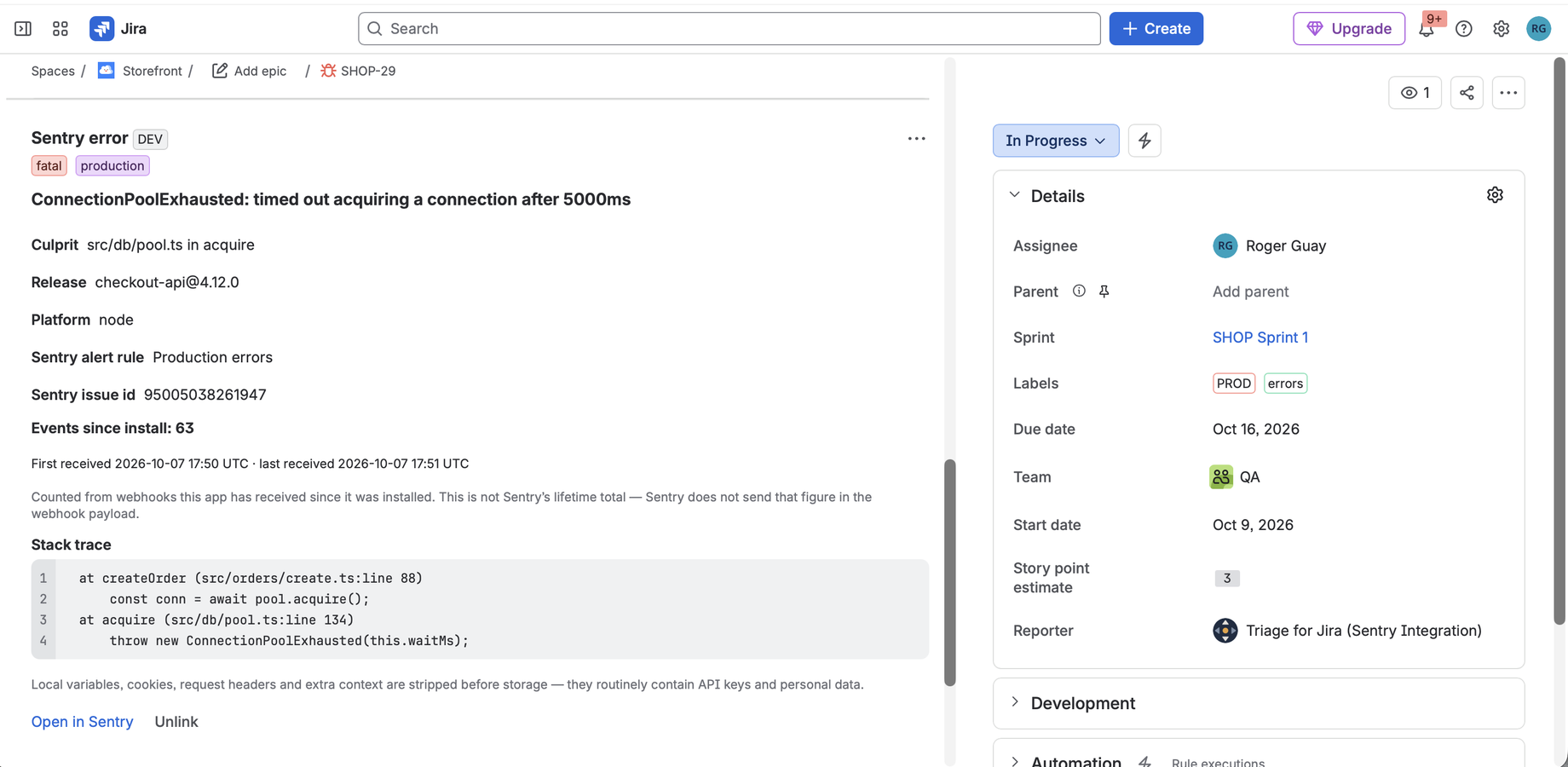
The work item carries the error title, the culprit, level, environment, release, a stack
trace excerpt and a link back to Sentry. Two of those become real Jira custom fields rather
than text in a description, so "Sentry Error Count" > 100 works in a board
filter, a dashboard gadget or a saved search.
Local variables, cookies, request headers and extra context are removed before anything is stored. Those hold whatever was in scope when the error happened, which in a real application means API keys and customer data. Stack frames are rebuilt from a short list of fields that are safe to keep, so anything Sentry adds later is dropped by default rather than passed through by default.
One error, one work item
Send the same error a thousand times and you get one work item with a count on it. The count goes up, a comment records it, and nobody opens a second ticket.
Deduplication only covers repeats of the same error, though, and that is not the failure mode that fills a backlog. A bad deploy produces hundreds of different errors in ten minutes, each with its own Sentry issue, each matching your rule. So every rule also has an hourly cap, on by default. Errors it holds back stay in Sentry and create work items the next time they fire.
Rules decide, and tell you what they decided
A rule matches on Sentry organisation and project, then narrows by error level, environment, how many times the error has fired, or a pattern in its title. Rules run in order and the first match wins. Each one names the Jira project and work type it creates in.
When a webhook does not become a work item, the reason is recorded: filtered by a rule, held back by the cap, already linked to a ticket you have, or no rule matched and here is what each one objected to. Silent failure is the complaint this category is known for, and it is the thing this app was built to answer.
- Off in every Jira project until you turn it on. Most projects have nothing to do with Sentry, and Sentry detail never appears in them.
- Attach a Sentry issue to a work item you already have. When the bug report came in before the error did, enrich that ticket instead of filing a duplicate.
- Resolve it in Sentry and Jira follows. A regression reopens the work item and leaves a comment saying why.
- Self-hosted Sentry needs no extra setup. Your instance posts to the same URL sentry.io would, and there is no inbound path to open.
What it deliberately does not do
The app never calls Sentry. Sentry calls it. That is what keeps it working on the free Developer plan, what makes self-hosted instances trivial, and what earns the Runs on Atlassian certification. It costs three things, and they are worth knowing before you install rather than after.
- It is inbound only. Resolving a work item in Jira does not resolve the error in Sentry. Sentry to Jira, never the reverse.
- The event count is what this app has seen since you installed it, not Sentry's lifetime total for that issue. That figure is not in the webhook, and fetching it would mean calling Sentry.
- It cannot see work items made by Sentry's own integration. If you use that integration's manual button as well, link the two and deduplication handles everything after.
Running it alongside Sentry's own integration
You do not have to choose. Sentry's integration handles issue links and gives you a button to create a Jira issue by hand. This one creates work items on its own, applies your rules, and puts the Sentry link and event count into real Jira fields. Both panels render on the same work item without interfering.
One thing to know. This app cannot see a work item that Sentry's button created, because finding out would mean calling Sentry. If you use that button on an error that also matches one of your rules, you will get two work items. Paste the Sentry URL into our panel on whichever one you are keeping, and deduplication takes care of everything after that.
Pricing
Free for Jira sites of ten users or fewer. Above that it is priced per Jira seat and stays below the cost of upgrading Sentry up to around 2,700 seats. Atlassian handles the billing and quotes the figure for your own seat count.
Documentation
The setup guide walks the Sentry and Jira sides in order, including the two steps people reliably miss. Troubleshooting starts from what you are looking at: find the message or the symptom, read what causes it.